

Introduction
In the realm of electronics and sensor - based projects, the combination of a pressure sensor and a 20x4 LCD display can yield highly useful and informative systems. As a supplier of 20x4 LCD displays, I am well - versed in the various applications and integration processes of these devices. This blog will guide you through the steps of using a 20x4 LCD display in a pressure sensor project, from understanding the components to the final implementation.
Understanding the Components
Pressure Sensor
A pressure sensor is a device that measures pressure and converts it into an electrical signal. There are different types of pressure sensors, such as piezoresistive, capacitive, and piezoelectric sensors. Each type has its own characteristics in terms of accuracy, sensitivity, and cost. For a basic pressure - sensing project, a piezoresistive pressure sensor is often a good choice due to its relatively simple working principle and cost - effectiveness. The output of the pressure sensor is usually an analog voltage that is proportional to the pressure applied to the sensor.
20x4 LCD Display
A 20x4 LCD (Liquid Crystal Display) can show 20 characters per line and has 4 lines in total, providing a relatively large display area to present information. It is commonly used in projects where more data needs to be shown at once. Compared with smaller displays like the 0802 LCD Display, 16x2 lcd display, and 16 x 4 lcd display, the 20x4 LCD can accommodate more text and data, making it suitable for complex projects like pressure - monitoring systems.
Hardware Connection
Connecting the Pressure Sensor
First, you need to power the pressure sensor. Most pressure sensors require a stable power supply, usually in the range of 3.3V to 5V. Connect the power pins of the sensor to the appropriate power source on your microcontroller board. Then, connect the signal output pin of the pressure sensor to an analog input pin of the microcontroller. For example, if you are using an Arduino board, you can connect the sensor output to one of the analog input pins (A0 - A5).
Connecting the 20x4 LCD display
The 20x4 LCD display typically has multiple pins for power, ground, data, and control. Connect the VSS (Ground) pin to the ground of your power source, and the VDD (Power) pin to the positive power supply (usually 5V). The V0 pin is used for contrast adjustment. You can connect it to a potentiometer to adjust the contrast easily.
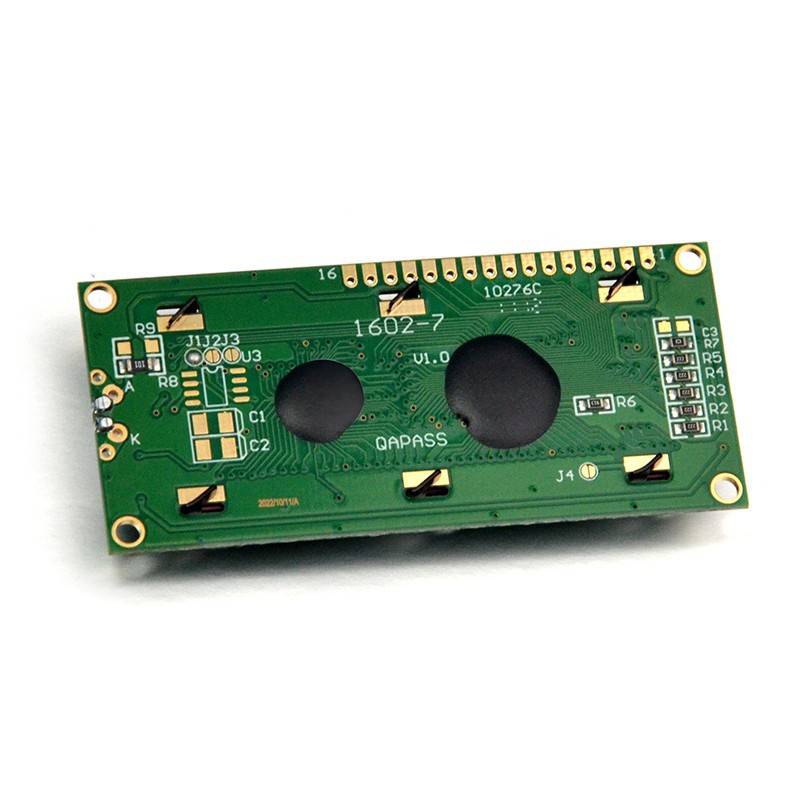

For data and control connections, the LCD has pins such as RS (Register Select), E (Enable), and data pins (D4 - D7 for 4 - bit mode or D0 - D7 for 8 - bit mode). In 4 - bit mode, which is more commonly used as it requires fewer microcontroller pins, connect the RS, E, D4, D5, D6, and D7 pins to the digital output pins of the microcontroller. Make sure to refer to the datasheet of your specific 20x4 LCD display and microcontroller for the correct pin - out.
Software Programming
Reading the Pressure Sensor
The first step in the software programming is to read the data from the pressure sensor. If you are using an Arduino, you can use the analogRead() function to read the analog voltage from the pressure sensor. The function will return a value between 0 and 1023, corresponding to a voltage range of 0V to 5V. You need to convert this raw value into an actual pressure value using the calibration data provided by the pressure sensor manufacturer. For example:
const int pressurePin = A0;
int sensorValue;
float pressure;

void setup() {
  Serial.begin(9600);
}

void loop() {
  sensorValue = analogRead(pressurePin);
  // Assume a simple linear relationship for conversion
  pressure = sensorValue * (5.0 / 1023.0);
  Serial.print("Pressure: ");
  Serial.println(pressure);
  delay(1000);
}
Displaying Data on the 20x4 LCD
To display data on the 20x4 LCD, you can use a library such as the LiquidCrystal library in Arduino. First, include the library in your code:
#include <LiquidCrystal.h>

// Initialize the LCD pins
LiquidCrystal lcd(12, 11, 5, 4, 3, 2);

void setup() {
  lcd.begin(20, 4);
  lcd.print("Pressure Monitor");
}

void loop() {
  // Read pressure as before
  int sensorValue = analogRead(pressurePin);
  float pressure = sensorValue * (5.0 / 1023.0);

  // Set the cursor to the second line and first column
  lcd.setCursor(0, 1);
  lcd.print("Pressure: ");
  lcd.print(pressure);
  lcd.print(" V");

  delay(1000);
}
Advanced Techniques
Calibration
The simple conversion method in the above code may not be accurate enough. To get more precise pressure readings, you need to calibrate the pressure sensor. This involves measuring the output of the sensor at known pressure values and creating a calibration curve. You can then use this curve to convert the sensor readings to accurate pressure values.
Data Logging
In addition to real - time display, you may want to log the pressure data over time. You can use an SD card module or an external storage device to save the data. This data can be used for further analysis, such as trend analysis or predictive maintenance.
Error Handling
In a real - world project, there may be errors in sensor readings or LCD display. You can implement error - handling mechanisms in your code. For example, if the sensor reading goes out of a reasonable range, you can display an error message on the LCD.
Conclusion
Using a 20x4 LCD display in a pressure sensor project can enhance the user experience by providing clear and detailed information about the pressure measurement. The combination of hardware connection and software programming allows you to create a functional pressure - monitoring system. As a 20x4 LCD display supplier, we offer high - quality displays that can meet the requirements of various projects. Whether you are working on a simple DIY project or a professional industrial application, our 20x4 LCD displays can be a great choice.
If you are interested in purchasing our 20x4 LCD displays for your pressure sensor projects or other applications, please feel free to contact us to start a procurement discussion. We are ready to provide you with the best products and technical support.
References
- Arduino Documentation: https://www.arduino.cc/reference/en/
- Pressure Sensor Datasheets from Manufacturer
- 20x4 LCD Display Datasheets from Manufacturer